News
News



【Guide to PD Fusion System】
Click the “PD Fusion" icon in the upper left corner of the screen to open the operation interface:
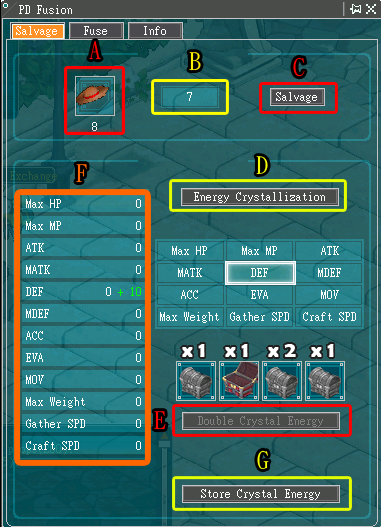
PD dismantle : Decompose unnecessary costumes and convert them to obtain crystallized values, which can be used to fuse the costumes to obtain new values.
-
[A] PD placement area: Place decomposable costumes into this column, and the energy value expected to be obtained after conversion will be displayed below.
-
[B] Energy value: Displays the total energy value currently accumulated.
-
[C] Salvage: Click to disassemble [A]'s costume.
-
[D] Energy Crystallization: Consume 1 point of energy crystallization for random transformation
-
[E] Double Crystal Energy: You need to have the decomposition elixir to use this button. After clicking, there will be a 25% chance of doubling the obtained ability value (the treasure chest icon is turned on and displayed ×2).
[F] Crystal Values: Displays the crystal values of each attribute currently held.
-
[G] Storage crystal energy: Complete the crystallization of the current energy (storage ability value). If you click [D] Energy Crystallization again without clicking, the system will automatically save it by default.
[Detailed description of interface functions]
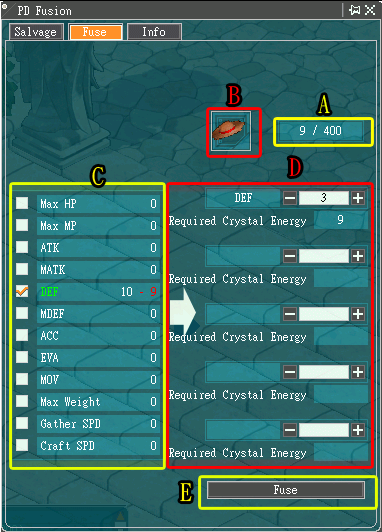
Attribute fusion: In the "PD Fusion" tab, combine the energy crystallization of different attributes with the specified outfit to enhance the attribute values required for the outfit.
■ Fusion Enhance
-
[A] Attribute upper limit: Displays the current required ability value and the upper limit of enhancement of the outfit. If the ability value has reached the full limit, no more values can be incorporated into it.
-
[B] PD to be fused: Place the PD to be strengthened. Hover your mouse over the PD to display the bonuses obtained through a green value.
-
[C] Attribute list: Lists the ability value items acquired so far.
-
[D] Crystal Energy Consumption: Displays the number of crystal energy points required for this fusion (corresponding to each attribute display).
-
[E] Fuse: Click to officially fuse the current attachment points into the PD.