《Pioneer Test Rewards Related》
Q: How do I claim the Pioneer Test [Student Coins]?
A: During the previous Pioneer Test, as long as you reached character level 25 or higher, logged in for at least 3 days, filled out the questionnaire during the Pioneer Test, and logged in with the same account used during the Pioneer Test after the game's release, you can claim them through the ""Redeem Clerkr"" in Angel Academy after logging into the game.
※Sanctuary Participation Rewards will be sent via in-game mail.
Q: How do I claim the Pioneer Test Angel Coins [150% Rebate]?
A: As long as you recharged Angel Coins during the previous Pioneer Test and logged in with the same account used during the Pioneer Test after the game's release, you can receive the corresponding [150% rebate] through the ""Angel Shop"" after logging into the game.
[Student Coins] and [150% Rebate]: Eligible angels must log in to the game with the same account to claim [Student Coins] and [related rebates] using any character in the game. Each claim is limited to one time only. Please take note.
《Version/ Login Information》
【Minimum Requirements】
Operating System: Windows 10 or Windows 11 (64-bit)
Processor: Intel Core i3-4130 / AMD Ryzen 3 1200
Memory: 8 GB RAM
Graphics Card: NVIDIA GeForce GT 730 / AMD Radeon R7 240 / Intel HD 4000
DirectX: Version 11
Network: Broadband Internet Connection
Storage: 5 GB available space
【Recommended Requirements】
Operating System: Windows 10 or Windows 11 (64-bit)
Processor: Intel Core i5-8400 / AMD Ryzen 5 2600
Memory: 16 GB RAM
Graphics Card: NVIDIA GeForce GTX 1050 / AMD Radeon RX 560
DirectX: Version: 11
Network: Broadband Internet connection
Storage: 10 GB available space
Q: Game update failed?
A: Close the game, click the [START] button in the main application again, and it will automatically update to the latest version. After the update is complete, restart the game. Alternatively, click the [PATCH] button to access the official website, download the manual update file, and place it in the corresponding installation folder to update.
《Language/Text Related》
Q: How do I select the language?
A: Open the main application, and select [LANGUAGE] in the update page to switch the game language.
Q: How do I translate other players' chat messages?
A: In the game, click the [Translate] button next to the text in the message. The translated text will automatically appear below.
《Event Schedule Related》
Q: How do I participate in events?
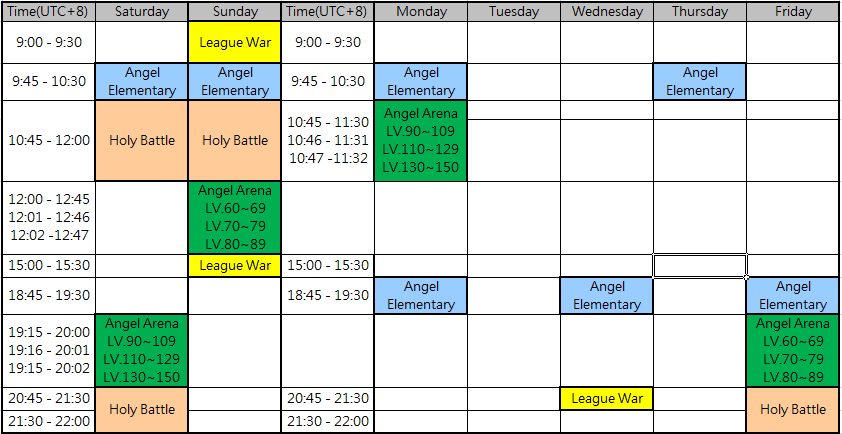
A: Please refer to the event schedule.
Registration opens 15 minutes before each event.
For example, for Sunday's Holy Battlefield:
10:45 – 11:00: Registration Period
11:00 – 12:00: Event Period
(Note: League War registration times depend on the in-game display.)
《Mail Function Related》
Q: What is the maximum number of mails I can receive?
A: You can receive a maximum of 100 mails in the game. Mail exceeding this limit will not be displayed immediately. You need to delete older mails to see the latest mail information.
Q: Will the mail expire?
A: In-game mail will expire. The mail content will indicate the expiration date. Please claim it as soon as possible.
《Regarding Game Top-Ups》
Q: How do I top up Angel Gold?
A: Open the Angel Shop in the game and click the [Top Up] button, or select the [Shop] on the official website to be linked to the top-up channel on that platform.
For example: Official Website Top-Up, STEAM Top-Up.
Q: How do I top up Angle Voucher?
A: Top-ups are only available through the official website's [Deals Mall].
Q: How do I report a payment or billing issue?
《Regarding Game Issue》
Q: How do I report an issue with the game?
If the game client crashes or freezes, please report it to the Customer Support Center and provide the following files from your game directory:
-
errXXXXXXXX.dmp
-
error.log
-
patch.log
-
start.log
=============
For non-client crash issues (such as update failures, launch failures, etc.), please provide the following files and information from your game directory:
-
patch.log
-
start.log
-
【IP Information】
【Regarding Game Content】
Q: Why did my pet suddenly run away?
A: Little Angels, please remember to take good care of your pets and maintain your 【Affinity】 with them!
When a pet's Amity drops below a certain level, they may leave their owner. As long as you keep your pet's Affinity at 41 or higher, they will not run away. We highly recommend that Little Angels keep a close eye on their pets' status and don't let them feel lonely!
Q: Why does my pet's average star rating look high, but the displayed star rating is lower?
A: Pet star rating is not determined solely by the average value. The system evaluates both the overall star rating and the distribution across all attributes.
If certain attributes are significantly lower than the average, the high stat discrepancy may lower the final displayed star rating. We recommend that Little Angels keep at least 5 attributes equal to or higher than the average star rating to prevent the displayed star rating from being affected.
Q: How do I change the in-game resolution?
A:
Prerequisites
1. Update the game client to version 0.1.0.6 or later.
2. Make sure the game is not running.
How to Change the Resolution
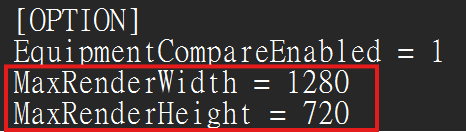
1. Open midage.ini in the game directory using Notepad.
2. Under [OPTION], modify or add the following two parameters: MaxRenderWidth and MaxRenderHeight. (The default values are 1280 and 720. We recommend not exceeding 1920 × 1080.)
3. Save the changes and restart the game.
※ Changing these settings may cause performance issues or abnormal object rendering. Please adjust these settings at your own discretion.